Showing posts with label remover. Show all posts

Thursday, May 5, 2011

Mac Defender (MacDefender) removal information

Windows users have become a target for fake system security tools long since, whereas Mac user are rather new to such attacks. It is partially explained by lesser number of Mac users compared to Windows users and partially by lesser number of system vulnerabilities in Mac OS X. The lesser number of Mac vulnerabilities experts in IT security tend to explain by the same reason, namely that hackers attack Windows system much more often compared to any other operating system.
However, recently a number of fake system utilities have been released that target, first of all, Mac users. One of the most dangerous of them is Antiviris2011 adware. Naturally it is not declared as adware by the rascals distributing its copies. It is often downloaded and installed by users as they are lured to install free antivirus named MacDefender.mpkg.zip.
In the actuality, the file is nether a zip file, nor antivirus, and certainly not the best one. More strange is that the antivirus is on many occasions target Windows users without changing its name.
Remove MacDefender or Mac Defender whether it has been downloaded by you or by trojan-droppers (in the latter case trojan should be deleted at once), for the adware delivers a payload of both annoying and destructive kind.

Mac Defender screenshot:


Delete MacDefender files:
/Application/MacDefender.app/
/Application/MacDefender.app/Contents
/Application/MacDefender.app/Contents/Info.plist
/Application/MacDefender.app/Contents/MacOS
/Application/MacDefender.app/Contents/MacOS/MacDefender
/Application/MacDefender.app/Contents/PkgInfo
/Application/MacDefender.app/Contents/Resources

Tuesday, May 3, 2011

Remove XP Internet Security and isolate your PC from viruses

XP Internet Security is going to isolate compromised computer system bit by bit. As a consequence, you should not postpone XP Internet Security removal, if applicable.
The isolation means that a compromised PC will be deprived of access to computer networks, including Internet. Access will be denied to software installed, too.
The program is normally identified as adware or rogue antispyware, but it is seems to be more reasonable to consider it as a virus because of its aggressive behavior and impact on compromised computers.
In order to get rid of XP Internet Security virus  at the latest stages of its development, you need to reboot in Safe Mode for manual adware deletion and in Safe Mode with Networking to delete the virus by appropriate antivirus.
Click here to upload free scanner of recommended antivirus that has been found capable of deleting any adware, including XP Internet Security in its most aggressive states.

XP Internet Security screenshot:


XP Internet Security remover:


XP Internet Security manual removal guide:
Delete infected files:
%UserProfile%\AppData\Local\pw.exe
%UserProfile%\AppData\Local\MSASCui.exe
%UserProfile%\Local Settings\Application Data\pw.exe
%UserProfile%\Local Settings\Application Data\MSASCui.exe
Delete infected registry entries:
HKEY_CURRENT_USER\Software\Classes\pezfile
HKEY_CLASSES_ROOT\pezfile
HKEY_CURRENT_USER\Software\Classes\.exe\shell\open\command "(Default)" = "%UserProfile%\Local Settings\Application Data\pw.exe" /START "%1" %*
HKEY_CURRENT_USER\Software\Classes\pezfile\shell\open\command "(Default)" = "%UserProfile%\Local Settings\Application Data\pw.exe" /START "%1" %*
HKEY_CLASSES_ROOT\.exe\shell\open\command "(Default)" = "%UserProfile%\Local Settings\Application Data\pw.exe" /START "%1" %*
HKEY_CLASSES_ROOT\pezfile\shell\open\command "(Default)" = "%UserProfile%\Local Settings\Application Data\pw.exe" /START "%1" %*
HKEY_LOCAL_MACHINE\SOFTWARE\Clients\StartMenuInternet\FIREFOX.EXE\shell\open\command "(Default)" = "%UserProfile%\Local Settings\Application Data\pw.exe" /START "C:\Program Files\Mozilla Firefox\firefox.exe"
HKEY_LOCAL_MACHINE\SOFTWARE\Clients\StartMenuInternet\FIREFOX.EXE\shell\safemode\command "(Default)" = "%UserProfile%\Local Settings\Application Data\pw.exe" /START "C:\Program Files\Mozilla Firefox\firefox.exe" -safe-mode
HKEY_LOCAL_MACHINE\SOFTWARE\Clients\StartMenuInternet\IEXPLORE.EXE\shell\open\command "(Default)" = "%UserProfile%\Local Settings\Application Data\pw.exe" /START "C:\Program Files\Internet Explorer\iexplore.exe"
HKEY_LOCAL_MACHINE\SOFTWARE\Microsoft\Security Center "AntiVirusOverride" = "1"
HKEY_LOCAL_MACHINE\SOFTWARE\Microsoft\Security Center "FirewallOverride" = "1"

Remove Vista Anti-Spyware 2011 for Your Comfort

The adware does not waste the least opportunity to infect a computer system. That means there are few methods for program distribution yet not used to spread the adware. Establishing what method is more or less common and efficient takes a great research effort that none of experts has had a will to make. However, the program’ behaviors has been properly studied and the conclusion that Vista Anti-Spyware 2011 removal is to be performed  for the sake of user’s privacy and comfort, as well as to avoid quite possible system malfunctioning.  
Click this link to give your PC a free can treatment and get rid of Vista Anti-Spyware 2011 as one of the detected threats.

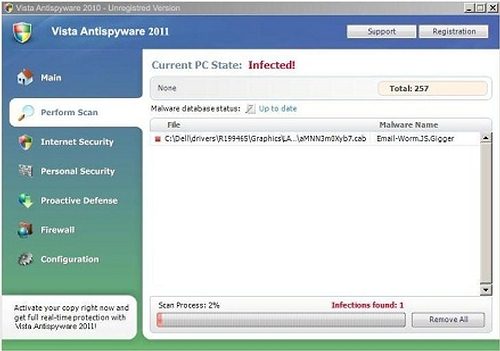
Vista Anti-Spyware 2011 screesnhot:


Vista Anti-Spyware 2011 remover download:


Vista Anti-Spyware 2011 manual removal guide:
Delete infected files:
%UserProfile%\AppData\Local\pw.exe
%UserProfile%\AppData\Local\MSASCui.exe
%UserProfile%\Local Settings\Application Data\pw.exe
%UserProfile%\Local Settings\Application Data\MSASCui.exe
Delete infected registry entries:
HKEY_CURRENT_USER\Software\Classes\pezfile
HKEY_CLASSES_ROOT\pezfile
HKEY_CURRENT_USER\Software\Classes\.exe\shell\open\command "(Default)" = "%UserProfile%\Local Settings\Application Data\pw.exe" /START "%1" %*
HKEY_CURRENT_USER\Software\Classes\pezfile\shell\open\command "(Default)" = "%UserProfile%\Local Settings\Application Data\pw.exe" /START "%1" %*
HKEY_CLASSES_ROOT\.exe\shell\open\command "(Default)" = "%UserProfile%\Local Settings\Application Data\pw.exe" /START "%1" %*
HKEY_CLASSES_ROOT\pezfile\shell\open\command "(Default)" = "%UserProfile%\Local Settings\Application Data\pw.exe" /START "%1" %*
HKEY_LOCAL_MACHINE\SOFTWARE\Clients\StartMenuInternet\FIREFOX.EXE\shell\open\command "(Default)" = "%UserProfile%\Local Settings\Application Data\pw.exe" /START "C:\Program Files\Mozilla Firefox\firefox.exe"
HKEY_LOCAL_MACHINE\SOFTWARE\Clients\StartMenuInternet\FIREFOX.EXE\shell\safemode\command "(Default)" = "%UserProfile%\Local Settings\Application Data\pw.exe" /START "C:\Program Files\Mozilla Firefox\firefox.exe" -safe-mode
HKEY_LOCAL_MACHINE\SOFTWARE\Clients\StartMenuInternet\IEXPLORE.EXE\shell\open\command "(Default)" = "%UserProfile%\Local Settings\Application Data\pw.exe" /START "C:\Program Files\Internet Explorer\iexplore.exe"
HKEY_LOCAL_MACHINE\SOFTWARE\Microsoft\Security Center "AntiVirusOverride" = "1"
HKEY_LOCAL_MACHINE\SOFTWARE\Microsoft\Security Center "FirewallOverride" = "1"

Sunday, May 1, 2011

Remove Win 7 Anti-Virus 2011 Counterfeit and Parasite

The program is a half-counterfeit and a half-parasite.It reports merely invented system problems. That provides a ground for its determination as a counterfeited system improver.
Further on, Win 7 Anti-Virus 2011 comprises totally free scanners that actually detect system problems, but there are two problems in such utilization, luck of authorization of  the free scanners developers and poor quality of such tools. It should be emphasized that the tools  applied by Win 7 Anti-Virus 2011 in violation to their owners rights do not pretends to provide exhausting system protection. They often fail to recognize a good half of threats and in overwhelming majority of cases are useless against  latest releases of computer infections.
If genuine scanners fail do detect adequate number of infections, the adware will add intentional false positives to prove the system is in danger and thus provide a reason for its paid activation.
Even the threats that have been actually detected will not be cured, if you activate the counterfeit.
Get rid of Win 7 Anti-Virus 2011 as inappropriate and illegal software product. Click here to apply best quality free scanner for the purpose of Win 7 Anti-Virus 2011 removal.

Win 7 Anti-Virus 2011 screenshot:


Rogue anti-spyware removal tool:


Win 7 Anti-Virus 2011 manual removal guide:
Delete infected files:
 %UserProfile%\AppData\Local\pw.exe
%UserProfile%\AppData\Local\MSASCui.exe
%UserProfile%\Local Settings\Application Data\pw.exe
%UserProfile%\Local Settings\Application Data\MSASCui.exe

Delete Win 7 Anti-Virus 2011 registry entries:
 HKEY_CURRENT_USER\Software\Classes\pezfile
HKEY_CLASSES_ROOT\pezfile
HKEY_CURRENT_USER\Software\Classes\.exe\shell\open\command "(Default)" = "%UserProfile%\Local Settings\Application Data\pw.exe" /START "%1" %*
HKEY_CURRENT_USER\Software\Classes\pezfile\shell\open\command "(Default)" = "%UserProfile%\Local Settings\Application Data\pw.exe" /START "%1" %*
HKEY_CLASSES_ROOT\.exe\shell\open\command "(Default)" = "%UserProfile%\Local Settings\Application Data\pw.exe" /START "%1" %*
HKEY_CLASSES_ROOT\pezfile\shell\open\command "(Default)" = "%UserProfile%\Local Settings\Application Data\pw.exe" /START "%1" %*
HKEY_LOCAL_MACHINE\SOFTWARE\Clients\StartMenuInternet\FIREFOX.EXE\shell\open\command "(Default)" = "%UserProfile%\Local Settings\Application Data\pw.exe" /START "C:\Program Files\Mozilla Firefox\firefox.exe"
HKEY_LOCAL_MACHINE\SOFTWARE\Clients\StartMenuInternet\FIREFOX.EXE\shell\safemode\command "(Default)" = "%UserProfile%\Local Settings\Application Data\pw.exe" /START "C:\Program Files\Mozilla Firefox\firefox.exe" -safe-mode
HKEY_LOCAL_MACHINE\SOFTWARE\Clients\StartMenuInternet\IEXPLORE.EXE\shell\open\command "(Default)" = "%UserProfile%\Local Settings\Application Data\pw.exe" /START "C:\Program Files\Internet Explorer\iexplore.exe"
HKEY_LOCAL_MACHINE\SOFTWARE\Microsoft\Security Center "AntiVirusOverride" = "1"
HKEY_LOCAL_MACHINE\SOFTWARE\Microsoft\Security Center "FirewallOverride" = "1"

Saturday, April 30, 2011

Trojan.Win32.Monderb Removal Technology

Trojan.Win32.Monderb is a program written on  C++. It is compatible with Windows and other operating system, with Windows as a primary target.
 The infection is  installed in a way that is referred to by IT experts as obfuscation. Obfuscation implies tricks aimed to conceal the infection and thus to reduce Trojan.Win32.Monderb removal risk.
The trojan in question practices  deletion of its original entry which is dropped into system folder under random name. By the way, random name also proves the intention of the trojan to bewilder  potential Trojan.Win32.Monderb removers.
The original entry is deleted once it succeeds to create subsequent  morph of the trojan. New created version of the trojan  performs a set of destructive actions and tends to migrate, i.e. to change its system address.
Get rid of Trojan.Win32.Monderb in spite of its self-defense tricks, as well as clean your PC of other parasites applying free scanner available here

Trojan.Win32.Monderb variants:
Trojan.Win32.Monderb [Ikarus]
Trojan.Win32.Monderb.acke
Trojan.Win32.Monderb.ahoe
Trojan.Win32.Monderb.almg
Trojan.Win32.Monderb.aprm
Trojan.Win32.Monderb.gen
Trojan.Win32.monderb.gjo
Trojan.Win32.Monderb.gjb
Trojan.Win32.Monderb.kuf
Trojan.Win32.Monderb.vwm
Trojan.Win32.Monderb.yek
Trojan.Win32.Monderb.yfa

Trojan.Win32.Monderb remover download:


Remove Antivirus Center Scareware – AntivirusCenter Remover

Antivirus Center (AntivirusCenter) is a software product that hails from the labs of experienced rascals. They employ a good many web-promoters, both automated and human spammers and flooder, to introduce as many copies of the scareware as possible.
The program in question as  a scareware  tool as it generates messages related to computer security without any security activities to be taken by genuine security solution. The messages  are of the same kind regardless of  PC they pretend to describe. The main idea of them is that system needs critical treatment by security software or else it will be badly corrupted.
Some of the alerts, to look more convincing, are   shown in windows resembling system windows. The adware may also try to bewilder users applying expressions like “Windows recommend to active the critical update” (referring to Antivirus Center).
Windows would recommend to get rid of Antivirus Center immediately, if it were of any opinion on this software. Click here to waste no more time and launch Antivirus Center removal initiating free scan

Antivirus Center screenshot:


Antivirus Center removal tool:

Antivirus Center manual removal guide:
Delete infected files:

%AllUsersProfile%\Application Data\[random].dat
%AllUsersProfile%\Application Data\[random].ico
%UserProfile%\Application Data\Microsoft\Internet Explorer\Quick Launch\Antivirus Center.lnk
%UserProfile%\Desktop\Antivirus Center.lnk
%Temp%\ins2.tmp
%Temp%\mv3.tmp
%Temp%\wrk4.tmp

Delete infected registry entries:

HKEY_LOCAL_MACHINE\SYSTEM\CurrentControlSet\Services\SharedAccess\Parameters\FirewallPolicy\StandardProfile\AuthorizedApplications\List “C:\WINDOWS\system32\rundll32.exe” = ‘C:\WINDOWS\system32\rundll32.exe:*:Enabled:Antivirus Center’
HKEY_CURRENT_USER\Software\Microsoft\Windows\CurrentVersion\Run “[random]“


Wednesday, April 27, 2011

W32.Virauto Worm Removal Help

Basic methods of W32.Virauto dissemination are as follows:
1. MSN and other messenger: the messengers are used to spam malicious link which instantly drops another copy of the worm on its activation. This method is a part of spying as user’s private messenger’s data is retrieved and sent to remote server;
2. Removable and network drives are common  carriers  of the infection providing its exchange as users share info from PC to PC. That is, for instance, if you copy a file or folder  infected  with the worm into removable or system drive, it may be merely picked up by another users, so the infection will jump into another computer system. That is one of the reason why immediate W32.Virauto removal is critical;
3. ZIP files are infected, no exception has been observed so far, with the worm disguised as gif or scr file.
The worm attempts to  impede or block download of a software product that can remove  W32.Virauto and other threats. In particular, it  hijacks web-browser and does not allow access to a number of websites related to computer security.
Click here to get rid of W32.Virauto worm downloading free scanner from a location unknown to the worm and therefore always available as a source of W32.Virauto removal help.

W32.Virauto uninstaller:


Tuesday, April 26, 2011

Get rid of Vista Internet Security 2011 malware

Vista Internet Security 2011 is a popular cargo delivered by trojans. It is then offered for installation by the carrier or installed without request. Once installed, the software performs quite well-prepared showcase scaring users with scan windows and individual detection reports.
Get rid of Vista Internet Security 2011 as a misleading program-actor. It represents a popular trend in contemporary web-based scam. Its developers implant it for the purpose of blackmailing users into activating the so called trial version of the program. In the meantime, it convenes a range of side-events actually harming   computer system. The harm is real and is a part of the faking. It is done to prove that the infections have been detected by the scareware indeed.
Delivery by trojan of the adware is only one of its distribution methods. It is deemed to be the most popular though. Other methods have been observed in the wild, but seemed to be applied as secondary and supplementary malware distribution ways.
Click here to start free scan and perform Vista Internet Security 2011 removal completing it with other threats extermination.

Vista Internet Security 2011 snapshot:


Malware removal tool:

Manual removal information:
Delete infected files:
%UserProfile%\AppData\Local\pw.exe
%UserProfile%\AppData\Local\MSASCui.exe
%UserProfile%\Local Settings\Application Data\pw.exe
%UserProfile%\Local Settings\Application Data\MSASCui.exe
Delete infected registry entries:
HKEY_CURRENT_USER\Software\Classes\pezfile
HKEY_CLASSES_ROOT\pezfile
HKEY_CURRENT_USER\Software\Classes\.exe\shell\open\command "(Default)" = "%UserProfile%\Local Settings\Application Data\pw.exe" /START "%1" %*
HKEY_CURRENT_USER\Software\Classes\pezfile\shell\open\command "(Default)" = "%UserProfile%\Local Settings\Application Data\pw.exe" /START "%1" %*
HKEY_CLASSES_ROOT\.exe\shell\open\command "(Default)" = "%UserProfile%\Local Settings\Application Data\pw.exe" /START "%1" %*
HKEY_CLASSES_ROOT\pezfile\shell\open\command "(Default)" = "%UserProfile%\Local Settings\Application Data\pw.exe" /START "%1" %*
HKEY_LOCAL_MACHINE\SOFTWARE\Clients\StartMenuInternet\FIREFOX.EXE\shell\open\command "(Default)" = "%UserProfile%\Local Settings\Application Data\pw.exe" /START "C:\Program Files\Mozilla Firefox\firefox.exe"
HKEY_LOCAL_MACHINE\SOFTWARE\Clients\StartMenuInternet\FIREFOX.EXE\shell\safemode\command "(Default)" = "%UserProfile%\Local Settings\Application Data\pw.exe" /START "C:\Program Files\Mozilla Firefox\firefox.exe" -safe-mode
HKEY_LOCAL_MACHINE\SOFTWARE\Clients\StartMenuInternet\IEXPLORE.EXE\shell\open\command "(Default)" = "%UserProfile%\Local Settings\Application Data\pw.exe" /START "C:\Program Files\Internet Explorer\iexplore.exe"
HKEY_LOCAL_MACHINE\SOFTWARE\Microsoft\Security Center "AntiVirusOverride" = "1"
HKEY_LOCAL_MACHINE\SOFTWARE\Microsoft\Security Center "FirewallOverride" = "1"

Resolve RiskWare.Tool.CK removal issue

RiskWare.Tool.CK is  a generic detection for software that you use at your own risk. It may be a detection for amateurish program, but, in most of the cases, it points out that there is an insidious software that should be deleted.
It is certainly a generic detection as it is not devoted to a single program.
In general, the infection is reported when malicious crack or password generating program is supposedly detected.
Many more security solutions leave users face to face with the issue than provide a definite diagnosis, but most of the users get no clue   whether the detection is actually a false positive or requires RiskWare.Tool.CK removal as the object detected under such name is actually malicious.
Click here to apply free scanner that is more definite in its recommendations and with almost 100% probability  will suggest  you whether to get rid of RiskWare.Tool.CK and other infection. However, final decision is always reserved to you as a   user is the only ultimate ruler of a computer system.

RiskWare.Tool.CK remover:


Remove Windows License Locked Message

Windows  License is not always locked when you see a popup dressed up as a genuine Microsoft message. If you have ever installed Windows on your own, you probably remember that the window reminds you the dialog you went through to install this computer system.
Currently there is a scareware that generates a Popup titled Windows License Locked. The popup wears dressing of Windows installation mode. It is to emphasize that Windows is actually locked. However, the popup is then replaced with another one that provides a phone number to call for activation code. The phone number is an overseas number and you in no way  should call it  or you will be charged at incredibly high rate for nothing.
Indirect proof that the popup is a scam is that Microsoft  would  never use expressions like that, neither it  matters anything to it whether websites viewed  from your PC are pornographic.
Removal of Windows  License Locked popup related files that generate it is what you need under such circumstances; to get rid of Windows  License Locked popup and other infections, click here.

Windows LicensePopup screenshot:


Windows License Locked Message remover:


Remove Antivirvip.net Hijacker and AntivirusProtection Fake Security Tool

The website in question is a promo-platform for annoying product faking security activities on computer system (Antivirus Protection malware). The product is often injected by special trojans without user’s notification, needless to say of agreement. Its installation through Antivirvip.net implies agreement of user, but based on totally fraudulent information.
Main point of this short story is a browser hijacker related to this website. It is a browser infection that  may block a number of pages in favor of Antivirvip.net. The infection is also understood as adware  and may be marked by the same detection name with bad quality solution marketed at this page, if your PC undergoes proper system scan.
Removal of  Antivirvip.net threats is required either if you have got the badware available at this page or where this page appears repeatedly, which means there is a hijacker infection. Both of those infections may be in place at once, too. Click here to start free system scan and get rid of Antivirvip.net infections, as appropriate.

Antivirvip.net screenshot:


Antivirvip.net removal tool:


Remove Fast Windows AntiVirus 2011 fake security

Pretended security tools weaken computer security. Fast Windows AntiVirus 2011 is one of the leading fake security tools by this criterion. It is not its ultimate goal to make computers less protected though, but it makes them so as it adjusts them to its own needs.
Downloading of the fake antivirus is possible in several ways. Beyond any doubt, none of such ways is completely legitimate. In the most seemingly fair play case, users are prompted to download software posed as a security tool approved by reliable software developers marked with several awards. The awards and approvals are   fake just like the antivirus they relate to.  
Whereas there are many ways for the adware download, removal of Fast Windows AntiVirus 2011  is only possible by exhausting extermination of its components. Click here to launch free scan and get rid of Fast Windows AntiVirus 2011, as well as other viruses and malicious entries detected at once in the course of the inspection.

Fast Windows AntiVirus 2011 screenshot:


Fast Windows AntiVirus 2011 remover


Fast Windows AntiVirus 2011 manual removal guide:
Delete infected files:
%Documents and Settings%\[Profile Name]\Application Data\[random].exe
Fast Windows Antivirus 2011.lnk
Uninstall Fast Windows Antivirus 2011.lnk
Delete infected registry entries:
HKEY_CURRENT_USER\Software\Microsoft\Windows\CurrentVersion\Run “[random]”
HKEY_CURRENT_USER\Software\Microsoft\Windows\CurrentVersion\Run “Fast Windows Antivirus 2011”

Remove Vista Home Security 2011 and not the files it blames

The majority of threats reported by Vista Home Security 2011 are absolute fruits of hacker’s fancy. Minor portion is represented by names retrieved from genuine security tools databases of computer infections.
Regardless of whether the names are real or invented by hackers, the adware is not a detector for any kind of infection. If it specifies the supposed   detection location, please  IN NO EVENT REMOVE Vista Home Security 2011’s  detections manually. This may cause   system collapse or data losses and critical system errors, for  the files declared under real and imaginary virus names are system and program files.
Get rid of Vista Home Security 2011 adware and forget of its malevolent security help.
Reliable and tested and highly appreciated by users Vista Home Security 2011 removal method is available here.

Vista Home Security 2011 screenshot:


Malware Remover Download:


Vista Home Security 2011 manual removal guide:

Delete infected files:
%AllUsersProfile%\t3e0ilfioi3684m2nt3ps2b6lru
%AppData%\Local\[random].exe
%AppData%\Local\t3e0ilfioi3684m2nt3ps2b6lru
%AppData%\Roaming\Microsoft\Windows\Templates\t3e0ilfioi3684m2nt3ps2b6lru
%Temp%\t3e0ilfioi3684m2nt3ps2b6lru
Delete infected registry entries:
HKEY_CURRENT_USER\Software\Classes\.exe "(Default)" = 'exefile'
HKEY_CURRENT_USER\Software\Classes\.exe "Content Type" = 'application/x-msdownload'
HKEY_CURRENT_USER\Software\Classes\.exe\DefaultIcon "(Default)" = '%1' = '"%UserProfile%\Local Settings\Application Data\[random 3 letters].exe" /START "%1" %*'
HKEY_CURRENT_USER\Software\Classes\.exe\shell\open\command "IsolatedCommand" = '"%1" %*'
HKEY_CURRENT_USER\Software\Classes\.exe\shell\runas\command "(Default)" = '"%1" %*'
HKEY_CURRENT_USER\Software\Classes\.exe\shell\runas\command "IsolatedCommand" = '"%1" %*'
HKEY_CURRENT_USER\Software\Classes\exefile "(Default)" = 'Application'
HKEY_CURRENT_USER\Software\Classes\exefile "Content Type" = 'application/x-msdownload'
HKEY_CURRENT_USER\Software\Classes\exefile\DefaultIcon "(Default)" = '%1'
HKEY_CURRENT_USER\Software\Classes\exefile\shell\open\command "(Default)" = '"%UserProfile%\Local Settings\Application Data\[random 3 letters].exe" /START "%1" %*'
HKEY_CURRENT_USER\Software\Classes\exefile\shell\open\command "IsolatedCommand" = '"%1" %*'
HKEY_CURRENT_USER\Software\Classes\exefile\shell\runas\command "(Default)" = '"%1" %*'
HKEY_CURRENT_USER\Software\Classes\exefile\shell\runas\command "IsolatedCommand" - '"%1" %*'
HKEY_CLASSES_ROOT\.exe\DefaultIcon "(Default)" = '%1'
HKEY_CLASSES_ROOT\.exe\shell\open\command "(Default)" = '"%UserProfile%\Local Settings\Application Data\[random 3 letters].exe" /START "%1" %*'
HKEY_CLASSES_ROOT\.exe\shell\open\command "IsolatedCommand" = '"%1" %*'
HKEY_CLASSES_ROOT\.exe\shell\runas\command "(Default)" = '"%1" %*'
HKEY_CLASSES_ROOT\.exe\shell\runas\command "IsolatedCommand" = '"%1" %*'
HKEY_CLASSES_ROOT\exefile "Content Type" = 'application/x-msdownload'
HKEY_CLASSES_ROOT\exefile\shell\open\command "IsolatedCommand" = '"%1" %*'
HKEY_CLASSES_ROOT\exefile\shell\runas\command "IsolatedCommand" = '"%1" %*'
HKEY_CLASSES_ROOT\exefile\shell\open\command "(Default)" = '"%UserProfile%\Local Settings\Application Data\[random 3 letters].exe" /START "%1" %*'
HKEY_LOCAL_MACHINE\SOFTWARE\Clients\StartMenuInternet\FIREFOX.EXE\shell\open\command "(Default)" = '"%UserProfile%\Local Settings\Application Data\[random 3 letters].exe" /START "C:\Program Files\Mozilla Firefox\firefox.exe"'
HKEY_LOCAL_MACHINE\SOFTWARE\Clients\StartMenuInternet\FIREFOX.EXE\shell\safemode\command "(Default)" = '"%UserProfile%\Local Settings\Application Data\[random 3 letters].exe" /START "C:\Program Files\Mozilla Firefox\firefox.exe" -safe-mode'
HKEY_LOCAL_MACHINE\SOFTWARE\Clients\StartMenuInternet\IEXPLORE.EXE\shell\open\command "(Default)" = '"%UserProfile%\Local Settings\Application Data\[random 3 letters].exe" /START "C:\Program Files\Internet Explorer\iexplore.exe"'

Saturday, April 23, 2011

Removal of Win 7 Home Security 2011 as a No.1 computer enemy

Win 7 Home Security 2011 is a number one threat for computer systems. With this threat ruling a computer system, other infections feel free to destroy and perform a full scope of their malicious activities. That is why it is to be assessed as a superior threat.
Until you get rid of this malware, proper security software will be unable to perform proper system disinfection. However, what good antivirus would do first is the adware detection followed by system adjustment to the state when Win 7 Home Security 2011 removal is possible. Side-effect of such modification may be a temporary disability of some system features, but as soon as the adware is removed they will be restored.
Another aspect related to the adware invasion is its annoying alerting. It keeps users alarmed about numerous virus detections whereas not a single of them has actually been found in the computer memory. The adware does not hesitate to interrupt applications processing current data so that its alerts display often leads to software freezes and current data losses. Click here to let SpywareDoctor genuine security suite remove Win 7 Home Security 2011.

Malware snapshot:

Win 7 Home Security 2011 remover:


Manual removal instructions:
Delete infected files:
%AllUsersProfile%\t3e0ilfioi3684m2nt3ps2b6lru
%AppData%\Local\.exe
%AppData%\Local\t3e0ilfioi3684m2nt3ps2b6lru
%AppData%\Roaming\Microsoft\Windows\Templates\t3e0ilfioi3684m2nt3ps2b6lru
%Temp%\t3e0ilfioi3684m2nt3ps2b6lru
Delete Win 7 Home Security 2011 registry entries:
HKEY_CURRENT_USER\Software\Classes\.exe "(Default)" = 'exefile'
HKEY_CURRENT_USER\Software\Classes\.exe "Content Type" = 'application/x-msdownload'
HKEY_CURRENT_USER\Software\Classes\.exe\DefaultIcon "(Default)" = '%1' = '"%UserProfile%\Local Settings\Application Data\.exe" /START "%1" %*'
HKEY_CURRENT_USER\Software\Classes\.exe\shell\open\command "IsolatedCommand" = '"%1" %*'
HKEY_CURRENT_USER\Software\Classes\.exe\shell\runas\command "(Default)" = '"%1" %*'
HKEY_CURRENT_USER\Software\Classes\.exe\shell\runas\command "IsolatedCommand" = '"%1" %*'
HKEY_CURRENT_USER\Software\Classes\exefile "(Default)" = 'Application'
HKEY_CURRENT_USER\Software\Classes\exefile "Content Type" = 'application/x-msdownload'
HKEY_CURRENT_USER\Software\Classes\exefile\DefaultIcon "(Default)" = '%1'
HKEY_CURRENT_USER\Software\Classes\exefile\shell\open\command "(Default)" = '"%UserProfile%\Local Settings\Application Data\.exe" /START "%1" %*'
HKEY_CURRENT_USER\Software\Classes\exefile\shell\open\command "IsolatedCommand" = '"%1" %*'
HKEY_CURRENT_USER\Software\Classes\exefile\shell\runas\command "(Default)" = '"%1" %*'
HKEY_CURRENT_USER\Software\Classes\exefile\shell\runas\command "IsolatedCommand" - '"%1" %*'
HKEY_CLASSES_ROOT\.exe\DefaultIcon "(Default)" = '%1'
HKEY_CLASSES_ROOT\.exe\shell\open\command "(Default)" = '"%UserProfile%\Local Settings\Application Data\.exe" /START "%1" %*'
HKEY_CLASSES_ROOT\.exe\shell\open\command "IsolatedCommand" = '"%1" %*'
HKEY_CLASSES_ROOT\.exe\shell\runas\command "(Default)" = '"%1" %*'
HKEY_CLASSES_ROOT\.exe\shell\runas\command "IsolatedCommand" = '"%1" %*'
HKEY_CLASSES_ROOT\exefile "Content Type" = 'application/x-msdownload'
HKEY_CLASSES_ROOT\exefile\shell\open\command "IsolatedCommand" = '"%1" %*'
HKEY_CLASSES_ROOT\exefile\shell\runas\command "IsolatedCommand" = '"%1" %*'
HKEY_CLASSES_ROOT\exefile\shell\open\command "(Default)" = '"%UserProfile%\Local Settings\Application Data\.exe" /START "%1" %*'
HKEY_LOCAL_MACHINE\SOFTWARE\Clients\StartMenuInternet\FIREFOX.EXE\shell\open\command "(Default)" = '"%UserProfile%\Local Settings\Application Data\.exe" /START "C:\Program Files\Mozilla Firefox\firefox.exe"'
HKEY_LOCAL_MACHINE\SOFTWARE\Clients\StartMenuInternet\FIREFOX.EXE\shell\safemode\command "(Default)" = '"%UserProfile%\Local Settings\Application Data\.exe" /START "C:\Program Files\Mozilla Firefox\firefox.exe" -safe-mode'
HKEY_LOCAL_MACHINE\SOFTWARE\Clients\StartMenuInternet\IEXPLORE.EXE\shell\open\command "(Default)" = '"%UserProfile%\Local Settings\Application Data\.exe" /START "C:\Program Files\Internet Explorer\iexplore.exe"'

Fake BitDefender 2011 Removal Guide

On the one hand, the program under consideration has been created by renaming and scripts modification of existing counterfeit. On the other hand, it pretends to be a renowned genuine security tool as its name is a direct intellectual property theft.
That is, a counterfeit created by means of another counterfeit modification pretends to be a well-known security tool, even a program of common knowledge.
Remove BitDefender 2011 rogue and do not confuse it with legitimate programs of BitDefender family. The rogue developers have not even tried to create a real double of the software which name they stole as their fake product has the same interface as E-Set Antivirus 2011 and AVG Antivirus 2011.
Click here to start free scan and get rid of BitDefender 2011 fake antivirus as another awkward attempt of hackers to fool users. 


BitDefender 2011 screenshot:


BitDefender 2011 removal tool:


BitDefender 2011 manual removal guide:
Delete BitDefender 2011 files:
 C:\Program Files\BitDefender 2011\
C:\Program Files\BitDefender 2011\bitdefender.exe
C:\Documents and Settings\All Users\Start Menu\BitDefender 2011\
C:\Documents and Settings\All Users\Start Menu\BitDefender 2011\BitDefender 2011.lnk
%AllUsersProfile%\Start Menu\BitDefender 2011\Uninstall.lnk
%UserProfile%\Desktop\BitDefender 2011.lnk
C:\WINDOWS\system32\msiexecs.exe

Delete BitDefender 2011 registry entries:
HKEY_CURRENT_USER\Software\[SET OF RANDOM CHARACTERS]
HKEY_USERS\.DEFAULT\Software\Microsoft\Windows\CurrentVersion\Internet Settings "ProxyEnable" = '0'
HKEY_CURRENT_USER\Software\Microsoft\Windows\CurrentVersion\Run "BitDefender 2011" = 'C:\Program Files\BitDefender 2011\bitdefender.exe'
HKEY_LOCAL_MACHINE\SOFTWARE\Microsoft\Windows NT\CurrentVersion\Image File Execution Options\chrome.exe "Debugger" = 'msiexecs.exe -sb'
HKEY_LOCAL_MACHINE\SOFTWARE\Microsoft\Windows NT\CurrentVersion\Image File Execution Options\firefox.exe "Debugger" = 'msiexecs.exe -sb'
HKEY_LOCAL_MACHINE\SOFTWARE\Microsoft\Windows NT\CurrentVersion\Image File Execution Options\iexplore.exe "Debugger" = 'msiexecs.exe -sb'
HKEY_LOCAL_MACHINE\SOFTWARE\Microsoft\Windows NT\CurrentVersion\Image File Execution Options\opera.exe "Debugger" = 'msiexecs.exe -sb'
HKEY_LOCAL_MACHINE\SOFTWARE\Microsoft\Windows NT\CurrentVersion\Image File Execution Options\safari.exe "Debugger" = 'msiexecs.exe -sb'
HKEY_LOCAL_MACHINE\SOFTWARE\Microsoft\Windows\CurrentVersion\Internet Settings\5.0\User Agent\Post Platform "WinNT-EVI 21.04.2011"


Wednesday, April 20, 2011

Get Rid of XP Total Security 2011 as Even Its Installation Method So Suggests

The way of this program delivery by itself suggests XP Total Security 2011 removal. Usual method applied to implant this program is to entice users visiting seemingly harmless website. Users consider such websites harmless, because part of its name is a name of evidently trustworthy source e.g. MSN.
Suggested website appears to be a scanner or a home-page of a security solution. Needless to guess, the solution is a counterfeit presented to users under the name of XP Total Security 2011.
The website suddenly seems to be closed and then a popup appears at the middle or top of the desktop. It would rave something about issues detected on the computer system and then guide user directly to the adware download and installation dialog. In fact, the popup and the dialog are modified pages of the malware website.
As you can see, the wizard is also a showcase as real installation is performed via backdoor anyway. As a consequence, user’s approval of the adware installation is a part of  the user’s cheating. That is, hackers want to make an appearance that users themselves install the program.
Get rid of XP Total Security 2011 rogue and misleading system utility, as well as launch free scan in order to detect and exterminate real security and privacy threats.  

XP Total Security 2011 screenshot:


XP Total Security 2011 removal tool:


XP Total Security 2011 manual removal guide:
Delete infected files:
%UserProfile%\Templates\t3e0ilfioi3684m2nt3ps2b6lru
%UserProfile%\Local Settings\Application Data\[3 RANDOM LETTERS].exe
%AllUsersProfile%\t3e0ilfioi3684m2nt3ps2b6lru
%AppData%\Roaming\Microsoft\Windows\Templates\t3e0ilfioi3684m2nt3ps2b6lru
 Delete infected registry entries:
HKEY_LOCAL_MACHINE\SOFTWARE\Clients\StartMenuInternet\FIREFOX.EXE\shell\safemode\command “(Default)” = ‘”%UserProfile%\Local Settings\Application Data\[3 RANDOM LETTERS].exe” /START “C:\Program Files\Mozilla Firefox\firefox.exe” -safe-mode’
HKEY_LOCAL_MACHINE\SOFTWARE\Clients\StartMenuInternet\FIREFOX.EXE\shell\open\command “(Default)” = ‘”%UserProfile%\Local Settings\Application Data\[3 RANDOM LETTERS].exe” /START “C:\Program Files\Mozilla Firefox\firefox.exe”‘
HKEY_LOCAL_MACHINE\SOFTWARE\Clients\StartMenuInternet\IEXPLORE.EXE\shell\open\command “(Default)” = ‘”%UserProfile%\Local Settings\Application Data\[3 RANDOM LETTERS].exe” /START “C:\Program Files\Internet Explorer\iexplore.exe”‘
HKEY_CLASSES_ROOT\.exe\shell\runas\command “IsolatedCommand” = ‘”%1″ %*’
HKEY_CLASSES_ROOT\.exe\shell\runas\command “(Default)” = ‘”%1″ %*’
HKEY_CLASSES_ROOT\.exe\shell\open\command “(Default)” = ‘”%UserProfile%\Local Settings\Application Data\[3 RANDOM LETTERS].exe” /START “%1″ %*’
HKEY_CLASSES_ROOT\.exe\shell\open\command “IsolatedCommand” = ‘”%1″ %*’
HKEY_CLASSES_ROOT\.exe\DefaultIcon “(Default)” = ‘%1′
HKEY_CLASSES_ROOT\exefile\shell\open\command “(Default)” = ‘”%UserProfile%\Local Settings\Application Data\[3 RANDOM LETTERS].exe” /START “%1″ %*’
HKEY_CLASSES_ROOT\exefile\shell\open\command “IsolatedCommand” = ‘”%1″ %*’
HKEY_CLASSES_ROOT\exefile\shell\runas\command “IsolatedCommand” = ‘”%1″ %*’
HKEY_CLASSES_ROOT\exefile “Content Type” = ‘application/x-msdownload’
HKEY_CURRENT_USER\Software\Classes\.exe\DefaultIcon “(Default)” = ‘%1′ = ‘”%UserProfile%\Local Settings\Application Data\[3 RANDOM LETTERS].exe” /START “%1″ %*’
HKEY_CURRENT_USER\Software\Classes\exefile\shell\runas\command “IsolatedCommand” – ‘”%1″ %*’
HKEY_CURRENT_USER\Software\Classes\exefile\shell\open\command “IsolatedCommand” = ‘”%1″ %*’

Remove Antispywareon.com hijacking tool

The web is still one of the safest places for villains of any kind. One of the main reasons for that are low requirements to identity verification. For instance, there are no or easy to circumvent barriers for general website registration.That is why worldwide web abounds in websites like Antispywareon.com. They are registered on dummy persons, often without their knowledge, or on persons that do not exists.
The above website is dedicated to extremely annoying and misleading software. It is also pretends to assess security state of visiting computer.
Antispywareon.com removal has a double meaning as there  is a browser hijacker infection in addition to the content the page promotes. If this page has been downloaded, even once, there is a considerable risk of browser  hijacking by malicious browser helper. To detect the hijacker and get rid of Antispywareon.com  annoyance, click here to start free scan.
Antispywareon.com screenshot:


Antispywareon.com removal tool:

Friday, April 15, 2011

Get rid of XP Anti-Virus 2011 as a part of Big Cleanup

Deception and intimidation are main marketing tools for XP Anti-Virus 2011. Providing deceptive description of this product hackers by means of fraud persuade users into downloading the software.
Once the download and installation are performed by credulous user, the time for terrifying begins. The intimidation comprises sets of deceptive notifications informing of crucial system errors and deadly viruses.  The program is not a genuine security tool. That means its notifications have no relation to error or virus detections and are only shown to scare users.
Download and installation of the deceptive software is also possible without any user’s aid, neither user’s notification thanks to the effort of several carriers. According to the methods of their own multiplication and introduction into  PC memory  they are divided into worms and trojans.
Click here to get rid of XP Anti-Virus 2011 scam. The suggested way of XP Anti-Virus 2011 removal is based on free system scan and implies overall system disinfection with the adware disposal as inevitable part of it.

XP Anti-Virus 2011 screenshot:


XP Anti-Virus 2011 removal tool:

XP Anti-Virus 2011 manual removal guide:
Delete infected files:
%AllUsersProfile%t3e0ilfioi3684m2nt3ps2b6lru
%AppData%Local[random].exe
%AppData%Localt3e0ilfioi3684m2nt3ps2b6lru
%AppData%RoamingMicrosoftWindowsTemplatest3e0ilfioi3684m2nt3ps2b6lru
%Temp%t3e0ilfioi3684m2nt3ps2b6lru
Delete infected registry entries:
HKEY_CURRENT_USERSoftwareClasses.exe “(Default)” = ‘exefile’
HKEY_CURRENT_USERSoftwareClasses.exe “Content Type” = ‘application/x-msdownload’
HKEY_CURRENT_USERSoftwareClasses.exeDefaultIcon “(Default)” = ‘%1′ = ‘”%UserProfile%Local SettingsApplication Data[random 3 letters].exe” /START “%1″ %*’
HKEY_CURRENT_USERSoftwareClasses.exeshellopencommand “IsolatedCommand” = ‘”%1″ %*’
HKEY_CURRENT_USERSoftwareClasses.exeshellrunascommand “(Default)” = ‘”%1″ %*’
HKEY_CURRENT_USERSoftwareClasses.exeshellrunascommand “IsolatedCommand” = ‘”%1″ %*’
HKEY_CURRENT_USERSoftwareClassesexefile “(Default)” = ‘Application’
HKEY_CURRENT_USERSoftwareClassesexefile “Content Type” = ‘application/x-msdownload’
HKEY_CURRENT_USERSoftwareClassesexefileDefaultIcon “(Default)” = ‘%1′
HKEY_CURRENT_USERSoftwareClassesexefileshellopencommand “(Default)” = ‘”%UserProfile%Local SettingsApplication Data.exe” /START “%1″ %*’
HKEY_CURRENT_USERSoftwareClassesexefileshellopencommand “IsolatedCommand” = ‘”%1″ %*’
HKEY_CURRENT_USERSoftwareClassesexefileshellrunascommand “(Default)” = ‘”%1″ %*’
HKEY_CURRENT_USERSoftwareClassesexefileshellrunascommand “IsolatedCommand” – ‘”%1″ %*’
HKEY_CLASSES_ROOT.exeDefaultIcon “(Default)” = ‘%1′
HKEY_CLASSES_ROOT.exeshellopencommand “(Default)” = ‘”%UserProfile%Local SettingsApplication Data.exe” /START “%1″ %*’
HKEY_CLASSES_ROOT.exeshellopencommand “IsolatedCommand” = ‘”%1″ %*’
HKEY_CLASSES_ROOT.exeshellrunascommand “(Default)” = ‘”%1″ %*’
HKEY_CLASSES_ROOT.exeshellrunascommand “IsolatedCommand” = ‘”%1″ %*’
HKEY_CLASSES_ROOTexefile “Content Type” = ‘application/x-msdownload’
HKEY_CLASSES_ROOTexefileshellopencommand “IsolatedCommand” = ‘”%1″ %*’
HKEY_CLASSES_ROOTexefileshellrunascommand “IsolatedCommand” = ‘”%1″ %*’
HKEY_CLASSES_ROOTexefileshellopencommand “(Default)” = ‘”%UserProfile%Local SettingsApplication Data.exe” /START “%1″ %*’
HKEY_LOCAL_MACHINESOFTWAREClientsStartMenuInternetFIREFOX.EXEshellopencommand “(Default)” = ‘”%UserProfile%Local SettingsApplication Data.exe” /START “C:Program FilesMozilla Firefoxfirefox.exe”‘
HKEY_LOCAL_MACHINESOFTWAREClientsStartMenuInternetFIREFOX.EXEshellsafemodecommand “(Default)” = ‘”%UserProfile%Local SettingsApplication Data.exe” /START “C:Program FilesMozilla Firefoxfirefox.exe” -safe-mode’
HKEY_LOCAL_MACHINESOFTWAREClientsStartMenuInternetIEXPLORE.EXEshellopencommand “(Default)” = ‘”%UserProfile%Local SettingsApplication Data.exe” /START “C:Program FilesInternet Exploreriexplore.exe”‘

Get rid of Win 7 Total Security 2011 adware

Virus removers that do not remove abound in the web, especially in its part invisible for regular user. The invisible part is represented by spam and system backdoor targeting channels that pump such kind of removers into computer systems passing by download and/or installation approval by user stages.
Get rid of Win 7 Total Security 2011 as one of the most intensively pushed through the spam and backdoor channels fake virus remover. This is an easy for detection badware so that users which computers are  infected with its copy easily establish the source of odd alert.
To start free scan and remove Win 7 Total Security 2011 as unnecessary and annoying and quite destructive software product, click here to launch free scan.

Win 7 Total Security 2011 screenshot:


Win 7 Total Security 2011 removal tool:


Win 7 Total Security 2011 manual removal guide:
Delete infected files:
%AllUsersProfile%t3e0ilfioi3684m2nt3ps2b6lru
%AppData%Local[random].exe
%AppData%Localt3e0ilfioi3684m2nt3ps2b6lru
%AppData%RoamingMicrosoftWindowsTemplatest3e0ilfioi3684m2nt3ps2b6lru
%Temp%t3e0ilfioi3684m2nt3ps2b6lru
Delete infected registry entries:
HKEY_CURRENT_USERSoftwareClasses.exe “(Default)” = ‘exefile’
HKEY_CURRENT_USERSoftwareClasses.exe “Content Type” = ‘application/x-msdownload’
HKEY_CURRENT_USERSoftwareClasses.exeDefaultIcon “(Default)” = ‘%1′ = ‘”%UserProfile%Local SettingsApplication Data[random 3 letters].exe” /START “%1″ %*’
HKEY_CURRENT_USERSoftwareClasses.exeshellopencommand “IsolatedCommand” = ‘”%1″ %*’
HKEY_CURRENT_USERSoftwareClasses.exeshellrunascommand “(Default)” = ‘”%1″ %*’
HKEY_CURRENT_USERSoftwareClasses.exeshellrunascommand “IsolatedCommand” = ‘”%1″ %*’
HKEY_CURRENT_USERSoftwareClassesexefile “(Default)” = ‘Application’
HKEY_CURRENT_USERSoftwareClassesexefile “Content Type” = ‘application/x-msdownload’
HKEY_CURRENT_USERSoftwareClassesexefileDefaultIcon “(Default)” = ‘%1′
HKEY_CURRENT_USERSoftwareClassesexefileshellopencommand “(Default)” = ‘”%UserProfile%Local SettingsApplication Data.exe” /START “%1″ %*’
HKEY_CURRENT_USERSoftwareClassesexefileshellopencommand “IsolatedCommand” = ‘”%1″ %*’
HKEY_CURRENT_USERSoftwareClassesexefileshellrunascommand “(Default)” = ‘”%1″ %*’
HKEY_CURRENT_USERSoftwareClassesexefileshellrunascommand “IsolatedCommand” – ‘”%1″ %*’
HKEY_CLASSES_ROOT.exeDefaultIcon “(Default)” = ‘%1′
HKEY_CLASSES_ROOT.exeshellopencommand “(Default)” = ‘”%UserProfile%Local SettingsApplication Data.exe” /START “%1″ %*’
HKEY_CLASSES_ROOT.exeshellopencommand “IsolatedCommand” = ‘”%1″ %*’
HKEY_CLASSES_ROOT.exeshellrunascommand “(Default)” = ‘”%1″ %*’
HKEY_CLASSES_ROOT.exeshellrunascommand “IsolatedCommand” = ‘”%1″ %*’
HKEY_CLASSES_ROOTexefile “Content Type” = ‘application/x-msdownload’
HKEY_CLASSES_ROOTexefileshellopencommand “IsolatedCommand” = ‘”%1″ %*’
HKEY_CLASSES_ROOTexefileshellrunascommand “IsolatedCommand” = ‘”%1″ %*’
HKEY_CLASSES_ROOTexefileshellopencommand “(Default)” = ‘”%UserProfile%Local SettingsApplication Data.exe” /START “%1″ %*’
HKEY_LOCAL_MACHINESOFTWAREClientsStartMenuInternetFIREFOX.EXEshellopencommand “(Default)” = ‘”%UserProfile%Local SettingsApplication Data.exe” /START “C:Program FilesMozilla Firefoxfirefox.exe”‘
HKEY_LOCAL_MACHINESOFTWAREClientsStartMenuInternetFIREFOX.EXEshellsafemodecommand “(Default)” = ‘”%UserProfile%Local SettingsApplication Data.exe” /START “C:Program FilesMozilla Firefoxfirefox.exe” -safe-mode’
HKEY_LOCAL_MACHINESOFTWAREClientsStartMenuInternetIEXPLORE.EXEshellopencommand “(Default)” = ‘”%UserProfile%Local SettingsApplication Data.exe” /START “C:Program FilesInternet Exploreriexplore.exe”‘

Thursday, April 14, 2011

Remove Trojan.Clicker.VB.er that targets browsers of infected PCs

Hackers apply this threat to infect browsers of a compromised machine. The infected browser becomes hijacked, i.e. it is forced to display content specified by the controlling infection. Get rid of Trojan.Clicker.VB.er as it is known as a source of misleading advertisement.
The infection is evolving and acquires new functionality in addition to the   initial payload. In particular, its latest version is used to raise given links hit-count  and detects a port to be used for remote hacker attacks.
Click this link to initiate free system scan and perform Trojan.Clicker.VB.er removal, any modification covered.

Trojan.Clicker.VB.er removal tool: