Monday, November 8, 2010

Remove Security Inspector 2010 identified as a clone of Antivirus Studio 2010

Antivirus Studio 2010 malware has been used as a template for this program. Even without user’s notification the program can manage to  get its place in the computer system. This implies presence of programs uploading the adware on the behalf of user. Such programs are often detected when computers infected with Security Inspector 2010 (SecurityInspector 2010) are properly scanned.
Get rid of Security Inspector 2010, if its alerts and nag screens are displayed in your monitor, even if you believe ignoring them is just enough. You will soon find them annoying as they slow down other applications and suddenly terminate them. The program is also reasonably blamed for Internet blocking. It applies several tricks that include block of Internet access. Web-browser may be blocked or Network Connections disabled. Click here to perform free scan and Security Inspector 2010 removal, as well as extermination other cyber pests detected. 

Security Inspector 2010 screenshots:


Security Inspector 2010 remover download:


Security Inspector 2010 removal instructions:
Delete Security Inspector 2010 files:
%Temp%\_2.tmp
%UserProfile%\Application Data\Microsoft\Internet Explorer\Quick Launch\Security Inspector 2010.lnk
%UserProfile%\Application Data\Security Inspector 2010\
%UserProfile%\Application Data\Security Inspector 2010\Security_Inspector_2010.exe
%UserProfile%\Application Data\Security Inspector 2010\securitycenter.exe
%UserProfile%\Application Data\Security Inspector 2010\securityhelper.exe
%UserProfile%\Application Data\Security Inspector 2010\taskmgr.dll
%UserProfile%\Start Menu\Programs\Security Inspector 2010.lnk
%UserProfile%\Start Menu\Programs\Security Inspector 2010\
%UserProfile%\Start Menu\Programs\Security Inspector 2010\Activate Security Inspector 2010.lnk
%UserProfile%\Start Menu\Programs\Security Inspector 2010\Help Security Inspector 2010.lnk
%UserProfile%\Start Menu\Programs\Security Inspector 2010\How to Activate Security Inspector 2010.lnk
%UserProfile%\Start Menu\Programs\Security Inspector 2010\Security Inspector 2010.lnk
Delete Security Inspector 2010 registry entries:
HKEY_CURRENT_USER\Software\Microsoft\Windows\CurrentVersion\Uninstall\Security Inspector 2010
HKEY_CURRENT_USER\Software\Security Inspector 2010
HKEY_CURRENT_USER\Software\Microsoft\Windows\CurrentVersion\Run “2kowmeuswvw3″
HKEY_CURRENT_USER\Software\Microsoft\Windows\CurrentVersion\Run “Security Inspector 2010″

Sunday, November 7, 2010

Remove Antispylake.com related trojans

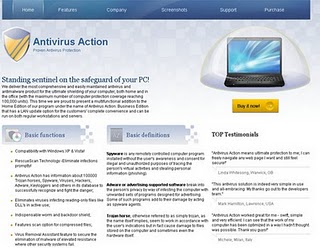
Software product marketed at the website is not safe, nothing to say of its compliance with vendor’s description. That is Antivirus Action - rogue and fake antispyware tool is pushed through this website. Supported by online intrusive ads and malicious browser helper object Antispylake.com is visited by thousands of users a day. Those who uploaded rogue antispyware from the website to try it need to immediately delete it as the rogue displays extremely destructive behavior. As concerns viruses, any detection by the rogue is a lie. Get rid of Antispylake.com hijacker and spyware infections. Antispylake.com  removal as deletion of related programs is available here.


Antispylake.com screenshot:


Antispylake.com removal tool:


Remove Quick Defragmenter scamware

Quick Defragmenter (QuickDefragmenter) warms up computers hosting it, but yet not enough to say that Ram temperature is 83 degrees by Celsius.  Moreover, the alert is replicated at any computer where the program runs. Such coincidence, according to the Probability Theory, is almost incredible. Without further research you can conclude that  Quick Defragmenter removal, according to the Probability Theory, would deliver you from deceptive program.
The program is classified as fake Quick Defragmenter and is a  duplicate of Quick Defragmenter. Trial versions of the faked system utilities are spread  thanks to  trojans aggressively and advertised websites in various combinations. Get rid of Quick Defragmenter and other rogue programs using free scanner
with antivirus available.

Quick Defragmenter screenshot:


Quick Defragmenter removal tool:


Quick Defragmenter manual removal guide:
Delete Quick Defragmenter files:
%UserProfile%\Start Menu\Programs\Quick Defragmenter
%UserProfile%\Desktop\Quick Defragmenter.lnk
%Temp%\
%Temp%\.bmp
%Temp%\.exe
%Temp%\winsp2up.exe
%Temp%\winsp2upd.dll
 Delete Quick Defragmenter registry entries:

HKEY_CURRENT_USER\Software\Microsoft\Windows\CurrentVersion\Run “
HKEY_CURRENT_USER\Software\Microsoft\Windows\CurrentVersion\Run “winsp2up.exe”

Remove Roxifind if Your PC Has Been Selected and Infected with the Virus

Roxifind is a virus spread to pre-selected computers. Before its introduction the IP of targeted machine is analyzed. The infection is immediately dropped onto computers with US, British and Australian IP. In other cases the machine to be victimized is examined by additional criteria.
The same-name website (Roxifind.com) is set as a search engine for infected machine. Removal of Roxifind is the only way to get reliable web search engines available again.
In order to get rid of Roxifind and/or detect and eradicate other infections, click here to launch free scan of your computer system. 

Roxifind removal tool:

Saturday, November 6, 2010

Remove Win32/SillyDl evolving family member

This infection is evolving in line with modification of web-browsers. The name is used to identify trojans family. Members of the family are designed to target certain flaws in web-browser. IE is, as usual, the most unprotected web-surfing tool and strong majority of the trojan victims have resulted from its vulnerabilities.
Removal of Win32/SillyDl trojan is usually to be followed by extermination of malicious content as the trojan is dropped to the purpose of uploading another abomination. Click here to get rid of Win32/SillyDl covering any modification including recent updates, as well as associated content downloaded by the trojan.

Win32/SillyDl removal tool:

Friday, November 5, 2010

Remove W32/Conficker.gen That Tries to Elude Deletion Destroying Restore Points of Windows

The knowledgeable worm infection is known to be a threat for Windows users only so far. It is a vulnerability specific infection. It has several modifications that correspond to vulnerabilities exploited. The most renowned is a version exploiting svchost.exe vulnerability. 
The infection is classified as worm of adjustable payload. It modifies or destroys  Windows   restore points so that W32/Conficker.gen removal is not available by system restore to the point before the worm introduction.
Get rid of W32/Conficker.gen covering any modification and get protected from its further updates applying timely updated antivirus solution available here


W32/Conficker.gen removal tool:

Remove HDD Defragmenter as a Clone of Other Fake System Optimization Remedies

Would you commission a program which first act at a computer system equipped with its copy is desktop theme resetting, to something like grey background, to do your system diagnostic (and when the program  proceeds with its  actions it blocks most frequently used executables and restricts files turnover and deletion)? That is a brief description of HDD Defragmenter (HDDDefragmenter), clone of quite notorious counterfeits in this field, namely System Defragmenter and Smart Defragmenter.
The program does not need users’ trust  or commission thanks to assistance of backdoor downloaders of various kind. In the other words, it is dropped without user’s agreement, so the question above needs no answer.  That does  not make the rogue optimizer unavailable for upload though as there are  numerous websites spreading the this unwanted software. 
Numerous errors detected by it s are all fabricated in hope to scare users into paying for its registrations. Get rid of HDD Defragmenter or  it will soon create true errors and annoy you to the utmost with its deceptive diagnostic  reports.
Click here to launch free scan followed by HDD Defragmenter removal and deletion of other detected cyber parasites.

HDD Defragmenter screenshot:


HDD Defragmenter removal tool:


HDD Defragmenter manual removal instructions:
Delete HDD Defragmenter files:
%Temp%\
%Temp%\.exe
%Temp%\dfrg.dat
%Temp%\dfrgr.dat
%Temp%\winsp1up.exe
%Temp%\winsp1upd.dll
%UserProfile%\Desktop\HDD Defragmenter.lnk
%UserProfile%\Start Menu\Programs\HDD Defragmenter\
%UserProfile%\Start Menu\Programs\HDD Defragmenter\HDD Defragmenter.lnk
%UserProfile%\Start Menu\Programs\HDD Defragmenter\Uninstall HDD Defragmenter.lnk 
Delete HDD Defragmenter registry entries:
 HKEY_CURRENT_USER\Software\Microsoft\Windows\CurrentVersion\Run “
HKEY_CURRENT_USER\Software\Microsoft\Windows\CurrentVersion\Run “winsp1up.exe”