Thursday, February 10, 2011

Remove Windows Optimal Solution and pay attention to other infections possible infiltration

For rogue antispyware to be successful it needs to be installed on computer systems. However, there is a strong competition between existing antivirus tools which fairness is not subject to any doubt.   Therefore the rogue needs to be downloaded promptly at many PCs  to ensure that at least several victims waste money into the counterfeit before it is replaced with genuine security tool and becomes known as a virus to wide public.
That is why the adware is intensively spread upon its releases and primarily by illegal tools like viruses and hijackers. As a conclusion,  dealing with  Windows Optimal Solution removal you most likely have a bunch of  malicious programs to delete. Apply comprehensive system security suite to get rid of Windows Optimal Solution adware and any other infections of your PC detected in reality, unlike the intentional false positives specified b y the tricky program – click here to run free scan.

Windows Optimal Solution screenshot:


Windows Optimal Solution remover:


Windows Optimal Solution manual removal guide:
Delete Windows Optimal Solution files:
 %Documents and Settings%\[UserName]\Application Data\[random].exe
%Documents and Settings%\[UserName]\Desktop\Windows Optimal Solution.lnk
%Documents and Settings%\[UserName]\Start Menu\Programs\Windows Optimal Solution
%Documents and Settings%\[UserName]\Start Menu\Programs\Windows Optimal Solution\Uninstall Windows Optimal Solution.lnk
Delete Windows Optimal Solution registry entries:
 HKEY_CURRENT_USER\Software\Microsoft\Windows NT\CurrentVersion\Winlogon “Shell” = ‘%Documents and Settings%\[UserName]\Application Data\[random].exe’
HKEY_LOCAL_MACHINE\SOFTWARE\Microsoft\Windows NT\CurrentVersion\Image File Execution Options\[random].exe “Debugger” = ‘svchost.exe’

Get rid of AntiViraAv rogue antivirus

AntiViraAv (Antivira AV)  is a member of slowly growing family of counterfeited malicious system tools causing unwanted changes to computer system and faking virus search and deletion. The program is closely associated with Antivirus. NET  released shortly before it. They share the same originator and have similar appearance.
Get rid of AntiViraAv  or it will render a number of useful applications unreadable. This is classified as advertisement by causing harm to the targeted audience. In the wild, the adware does not allow certain application to run and then generates the following alert:
  “Security Warning
Application cannot be executed. The file .exe is infected. Do you want to activate your antivirus software now?”
Click here to initiate free system scan and perform AntiViraAv  removal as important part of system purification.

AntiViraAv screenshot:


AntiViraAv removal tool:

AntiViraAv manual removal guide:
Delete AntiViraAv files:
%Temp%\\.exe
Delete AntiViraAv registry entries:
HKEY_CURRENT_USER\Software\
HKEY_CURRENT_USER\Software\Microsoft\Internet Explorer\PhishingFilter “Enabled” = ‘0′
HKEY_CURRENT_USER\Software\Microsoft\Windows\CurrentVersion\Internet Settings “ProxyOverride” = ”
HKEY_CURRENT_USER\Software\Microsoft\Windows\CurrentVersion\Internet Settings “ProxyServer” = ‘http=127.0.0.1:18810′
HKEY_CURRENT_USER\Software\Microsoft\Windows\CurrentVersion\Internet Settings “ProxyEnable” = ‘1′

Tuesday, February 8, 2011

Remove PC Security 2011 and Its Fake Runtime Protection

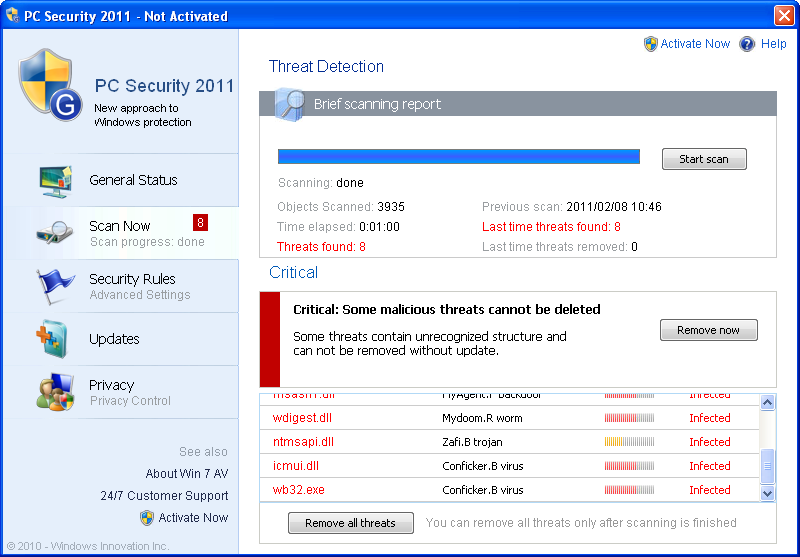
Pretending to take care  of system security the adware  interrupts or disables,  or   attempts to interrupt or disable, quite legitimate and uninfected programs. For example, iexpore.exe is allegedly found infected with Conficker virus and reported by   the  adware under review blocked to prevent spyware activities. This information is provided in the alert titled  “PC Security 2011 – Runtime Protection” .
Removal of PC Security 2011 is not just a measure aimed at eliminating misleading alerts. This should also be understood as a protection of useful software.   Fortunately, the adware has not been found to crash other software so that its safe deletion will eliminate any restrictions and you will get your useful programs in your disposal again. Click here to initiate free scan and get rid of PC Security 2011

PC Security 2011 screenshot:


PC Security 2011 removal tool:


PC Security 2011 manual removal guide:
Delete PC Security 2011 files:
 %UserProfile%\Application Data\.csrss
%UserProfile%\Application Data\.exe
%UserProfile%\Application Data\413A.C81
%UserProfile%\Application Data\.exe
%UserProfile%\Application Data\dwm.exe
%UserProfile%\Application Data\Microsoft\conhost.exe
%UserProfile%\Application Data\PC Security 2011\
%UserProfile%\Application Data\PC Security 2011\_001.png
%UserProfile%\Application Data\PC Security 2011\_002.png
%UserProfile%\Application Data\PC Security 2011\_005.png
%UserProfile%\Application Data\PC Security 2011\_006.png
%UserProfile%\Application Data\PC Security 2011\_007.png
%UserProfile%\Application Data\PC Security 2011\_ico1.png
%UserProfile%\Application Data\PC Security 2011\_ico2.png
%UserProfile%\Application Data\PC Security 2011\_ico3.png
%UserProfile%\Application Data\PC Security 2011\activate_01.png
%UserProfile%\Application Data\PC Security 2011\activate_02.png
%UserProfile%\Application Data\PC Security 2011\activate_03.png
%UserProfile%\Application Data\PC Security 2011\activate_hdr_1.png
%UserProfile%\Application Data\PC Security 2011\activate_hdr_2.png
%UserProfile%\Application Data\PC Security 2011\activate_hdr_bg.png
%UserProfile%\Application Data\PC Security 2011\at.png
%UserProfile%\Application Data\PC Security 2011\balloon_174.png
%UserProfile%\Application Data\PC Security 2011\balloon_201.png
%UserProfile%\Application Data\PC Security 2011\bg_button_a.png
%UserProfile%\Application Data\PC Security 2011\bg_button_span.png
%UserProfile%\Application Data\PC Security 2011\blank.gif
%UserProfile%\Application Data\PC Security 2011\block_p_01.png
%UserProfile%\Application Data\PC Security 2011\block_p_03.png
%UserProfile%\Application Data\PC Security 2011\blue.png
%UserProfile%\Application Data\PC Security 2011\critical_202.png
%UserProfile%\Application Data\PC Security 2011\defender_001.png
%UserProfile%\Application Data\PC Security 2011\defender_002.png
%UserProfile%\Application Data\PC Security 2011\defender_003.png
%UserProfile%\Application Data\PC Security 2011\defender_004.png
%UserProfile%\Application Data\PC Security 2011\defender_005.png
%UserProfile%\Application Data\PC Security 2011\defender_006.png
%UserProfile%\Application Data\PC Security 2011\defender_007.png
%UserProfile%\Application Data\PC Security 2011\defender_008.png
%UserProfile%\Application Data\PC Security 2011\filder.png
%UserProfile%\Application Data\PC Security 2011\header.png
%UserProfile%\Application Data\PC Security 2011\i_1.png
%UserProfile%\Application Data\PC Security 2011\i_2.png
%UserProfile%\Application Data\PC Security 2011\i_3.png
%UserProfile%\Application Data\PC Security 2011\level.png
%UserProfile%\Application Data\PC Security 2011\loading.gif
%UserProfile%\Application Data\PC Security 2011\logo.png
%UserProfile%\Application Data\PC Security 2011\m.png
%UserProfile%\Application Data\PC Security 2011\off.png
%UserProfile%\Application Data\PC Security 2011\on.png
%UserProfile%\Application Data\PC Security 2011\progressbar.gif
%UserProfile%\Application Data\PC Security 2011\progressbar_bg_1.gif
%UserProfile%\Application Data\PC Security 2011\prot.png
%UserProfile%\Application Data\PC Security 2011\scan_res_icon.png
%UserProfile%\Application Data\PC Security 2011\t01.png
%UserProfile%\Application Data\PC Security 2011\t02.png
%UserProfile%\Application Data\PC Security 2011\update.png
%UserProfile%\Application Data\PC Security 2011\w1.png
%UserProfile%\Application Data\PC Security 2011\w2.png
%UserProfile%\Application Data\PC Security 2011\w3.png
%UserProfile%\Application Data\PC Security 2011\w4.png
%UserProfile%\Application Data\PC Security 2011\w5.png
%UserProfile%\Application Data\PC Security 2011\warning_popup_072.png
%UserProfile%\Application Data\PC Security 2011\warning_popup_200.png
%UserProfile%\Application Data\Uninstall_Security\
%UserProfile%\Application Data\Uninstall_Security\uninstall_security.lnk
%Temp%\1.tmp
%Temp%\1.tmp.exe
%Temp%\4.tmp
%Temp%\csrss.exe
%UserProfile%\Start Menu\Programs\PC Security 2011\
%UserProfile%\Start Menu\Programs\PC Security 2011\PC Security 2011.lnk
%UserProfile%\Start Menu\Programs\Startup\PC2011.lnk
c:\Program Files\PC Security 2011\
c:\Program Files\PC Security 2011\PC2011.exe
Delete PC Security 2011 registry entries:
 HKEY_CURRENT_USER\Software\PC Security 2011
HKEY_CURRENT_USER\Software\Microsoft\Windows\CurrentVersion\Internet Settings "ProxyServer" = 'http=127.0.0.1:53495'
HKEY_LOCAL_MACHINE\SOFTWARE\Microsoft\Windows\CurrentVersion\Run "conhost" = '%UserProfile%\Application Data\Microsoft\conhost.exe'
HKEY_CURRENT_USER\Software\Microsoft\Windows\CurrentVersion\Internet Settings "ProxyEnable" = '1'
HKEY_CURRENT_USER\Software\Microsoft\Windows NT\CurrentVersion\Windows "load" = '%Temp%\csrss.exe'


Monday, February 7, 2011

Gahsoft.com hijacker removal advices

Gahsoft.com consists of several pages, which are made visible to visitor subject to the way the visitor has arrived to this website. The website promotes Antivirus.Net  that is a self-promoted fake antivirus.   It is promoted at descriptive and interactive pages of this website. There are links and other online redirecting facilities leading either to descriptive or interactive page of the website. There is also a browser hijacker applied to open both, or one of, the pages subject to its adjustments.
Hijacker of Gahsoft.com  removal is needed in case you experience regular redirections to this website and, if you have uploaded  the rogue as suggested, get rid of Gahsoft.com adware. Click here to start free scan to the adware  and/or hijacker detection and removal purposes.

Gahsoft.com screenshot:


Gahsoft.com removal tool:


Saturday, February 5, 2011

Remove Security Defender as another Threat Exploiting Updates Request Trickery

Security Defender (SecurityDefender), a program closely related to Antimalware Defender,  is another threat that arrives under the guise of updates for Windows.  The above is the most popular way of its distribution, but other techniques are used, too, though to the less extent.
The program is defined as a threat due to informational attack on user and attempts to prevent proper antispyware installation and creating obstacles to its functioning.  It refers to names of infections retrieved from threat descriptions of leading antivirus tools.  For example, imitation of win32/yahoopass.A detection by the program has been observed. The  reported name is a denomination of real threat, but it is unlikely to be in place in the memory of your PC or that is a mere coincidence. Get rid of Security Defender malware and related trojans, which are real threats used to further its installation and following activities.
Click here to start free system scan and execute Security Defender removal, as well as detections of viruses reported after proper observations.


Security Defender remover:


Security Defender manual removal guide:
Delete Security Defender files:
%UserProfile%\Application Data\[random].exe
Delete Security Defender registry entries:
HKEY_CURRENT_USER\Software\Microsoft\Windows NT\CurrentVersion\Winlogon “Shell” = ‘%UserProfile%\Application Data\.exe’

Thursday, February 3, 2011

Remove Poprog.com hijacker and related fraudware

You can find at least one virus  harming your PC, if experience repeated  (at any frequency) appearances of  the website specified in the title above in your browser window. The point  is that the website’s visitors, at least, a significant part of them, tend to open this URL more than once. Since such behavior does not correspond to average user’s profile, the conclusion is that many users need to watch this website against their will. This is possible thanks to the redirection agent, which is a virus targeting web-browser. It is the hijacker that makes of users involuntary fans of this website.
Removal of Poprog.com page from the list of pages to be opened without user’s  order is recommended, because of the content of this page. If its content has been uploaded, system disinfection should also cover its deletion (Antivirus. Net fake system security tool removal). Click here to get rid of Poprog.com threats.

Progressmb.com screenshot:


Progressmb.com removal tool:


Remove Serious System Error Fake Alert Eliminating Its Source

Serious System Error is a notification that may be issued by computer system that is about to collapse and requires urgent repair.  However, this message has been recently misused by deceptive software, which is known to bear several dozens of names. Its recent names are WinDisk, WinHDD.  The program is unwanted PC utility that  generates a bunch of misleading notifications, including the alert above. In such a case, you are watching fake Serious System Error alert. It is often the most frequently shown alert by adware that annoys users to the utmost so they are eager to get rid of Serious System Error alert. Naturally  removal of Serious System Error alert (fake one)  is to be performed as extermination of the adware generating it – click here to start free scan by suitable remover.

Serious System Error popup screenshot:


Serious System Error popup remover: